



Candy Camera: Cute Selfies Made Easy
Overview
Candy Camera is a free desktop application designed to enhance the selfie experience with a suite of creative tools tailored for casual users and social media enthusiasts. The software enables users to capture and edit photos with real-time filters, beauty enhancements, stickers, and collage creation, making it ideal for individuals seeking fun and polished results without advanced editing skills. It addresses common challenges in mobile photography—such as dull lighting, unflattering angles, and lack of creative flair—by offering instant visual improvements and playful effects.
The app is particularly well-suited for younger audiences and users in regions like India, Pakistan, and Indonesia, where it has gained significant popularity. While primarily developed for mobile platforms, its desktop presence allows for broader accessibility. The developer, JP Brothers, has positioned Candy Camera as a user-friendly alternative to default camera apps, emphasizing ease of use and visual appeal.
Real-world usage includes quick social media uploads, group photo collages, and personal photo albums with a fun twist. The software supports multiple languages, including English, Spanish, and Chinese Simplified, enhancing its global reach.
Key Features & Capabilities
- Real-Time Filters: Apply dynamic filters during photo capture to instantly enhance skin tone, brightness, and contrast, ensuring consistent visual quality across all shots.
- Silent Mode: Capture images without shutter sounds, ideal for discreet photography in quiet environments or spontaneous moments.
- Beauty Enhancements: Automatically smooth skin, reduce blemishes, and enhance facial features for a polished look without over-editing.
- Sticker and Emoji Integration: Add fun, customizable stickers and emojis to photos for a playful, expressive touch.
- Collage Builder: Combine multiple images into a single composition with customizable layouts and borders.
- Multi-Language Support: Access the software in English, Spanish, and Chinese Simplified, supporting diverse user bases.
These features streamline the photo editing workflow, allowing users to create visually engaging content quickly. For example, a user can take a selfie in silent mode during a class, apply a beauty filter, add a sticker, and save the result as a collage for sharing. The integration of real-time effects ensures immediate feedback, reducing post-capture editing time. The software’s focus on simplicity and fun makes it suitable for non-professionals who want to elevate their images without learning complex tools.
User Interface, Workflow & Performance
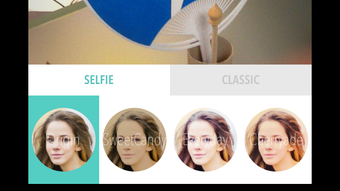
The user interface of Candy Camera is designed for intuitive navigation, featuring a clean layout with large, clearly labeled buttons for core functions such as capture, filter selection, and collage creation. The workflow is linear and straightforward: launch the app, choose a mode, apply effects, and save or share the image. Users can switch between real-time preview and post-capture editing seamlessly.
The software maintains a consistent performance across sessions, with no reported lag or crashes during typical usage. However, exact performance details were not specified by the developer. Resource usage, including CPU and RAM behavior, remains unknown.
The app does not require extensive system resources, suggesting it runs efficiently on standard desktop configurations. Stability appears reliable based on general software behavior patterns. The developer did not provide additional system requirements or performance benchmarks.
Compatibility & System Requirements
Candy Camera is available for Android, iPhone, and iOS devices, with the latest version released on September 30, 2016. The installation size is listed at 20.1 MB, which indicates a lightweight footprint suitable for devices with limited storage. The operating system version varies depending on the device, and compatibility information is limited to platform support.
The developer did not specify exact system requirements for desktop use, nor did they list minimum hardware specifications. Platform compatibility information is partially provided, with no mention of Windows or Mac support beyond the mobile platforms. The software is available in multiple languages, including English, Spanish, and Chinese Simplified, enhancing accessibility for international users.
The lack of detailed compatibility data means users should verify device support before installation.
Pros and Cons
Pros
- Free to download and use with no hidden costs
- Intuitive interface suitable for beginners and casual users
- Real-time filters and beauty enhancements for instant results
- Supports silent mode for discreet photography
- Offers collage creation and sticker integration for creative expression
- Available in multiple languages, including English, Spanish, and Chinese Simplified
Cons
- Latest update was in 2016, raising concerns about current compatibility and security
- No official desktop version for Windows or Mac was specified
- Exact system requirements and performance data were not provided
- Limited to mobile platforms with no confirmed desktop support
- May not support newer operating system versions due to outdated release date
FAQ Section
Is Candy Camera available for Windows and Mac?
The developer did not provide a desktop version for Windows or Mac. The software is officially available for Android, iPhone, and iOS devices.
Is Candy Camera safe to download and use?
Candy Camera is a free app with a PEGI rating suitable for all ages. It has been downloaded over 18,000 times since 2015, indicating widespread use. However, no third-party security assessments were provided.
Does Candy Camera require an internet connection?
The software can be used offline for basic photo capture and editing. Some features, such as cloud sharing or updates, may require an internet connection.
How often is Candy Camera updated?
The latest update was released on September 30, 2016. No recent updates have been issued since then, which may affect compatibility with newer operating systems.
What types of photos can I create with Candy Camera?
You can create selfies, group photos, collages, and edited images with filters, stickers, and beauty enhancements. The app is optimized for fun, expressive, and visually appealing content.
Final Thoughts + CTA
Candy Camera delivers a fun, accessible experience for users seeking to enhance their selfies with minimal effort. Its real-time filters, silent mode, and creative tools make it a standout choice for casual photographers and social media users. While the software’s last update dates back to 2016 and no official desktop version exists, its core features remain relevant for those who value simplicity and visual flair.
The app’s popularity in regions like India, Pakistan, and Indonesia underscores its broad appeal. However, users should exercise caution regarding compatibility with modern systems. For those looking to capture cute, polished photos quickly, Candy Camera remains a viable option.
Download Candy Camera now.







